
Podcasting Equipment: Why eLearning Specialists Need It
Podcasting equipment is no longer just a creator concern; it is becoming a strategic investment for L&D teams and eLearning specialists, too. As organizations expand into audio-based learning, podcasts are emerging as a scalable format for knowledge sharing, leadership communication, and continuous learning.
This change moves us from just creating content to producing full learning experiences. A good podcast setup goes beyond recording audio; it focuses on providing clear, consistent, and accessible learning journeys. That’s why it’s crucial to know what equipment is needed for a podcast, from a reliable microphone to important tools.


The right podcast recording equipment directly affects audio quality, which in turn influences how well learners absorb information. Poor sound can reduce engagement, while a clear, structured podcast setup for beginners or professionals can enhance focus and retention. At the same time, choosing the right equipment needed to start a podcast determines how easily teams can scale production across programs, departments, or global audiences.
In this context, decisions about podcasting equipment, whether for beginners or advanced setups, are strategic. Why? Podcasts are quickly becoming a key part of the learning experience.
Table Of Contents
What Podcasting Equipment Is Needed For A Podcast?
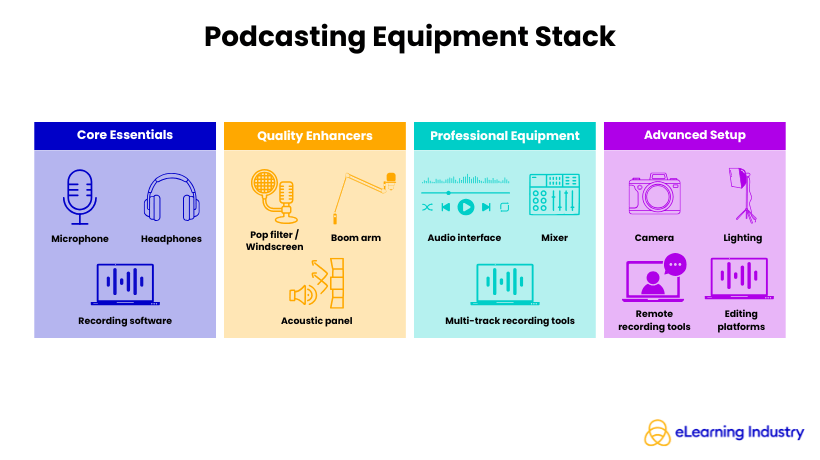
Podcasting equipment includes a microphone, headphones, recording software, and some extra tools to ensure clear audio quality. Knowing the key parts will help you make better choices, whether you’re setting up a basic podcast or planning a more complex production.
Microphone And Headphones
The equipment needed for a podcast is pretty basic. The most important item is a microphone. You can choose a USB mic for ease of use or an XLR mic for better quality and more options. You’ll also need closed-back headphones to listen to your audio while recording. This helps you monitor the sound and prevents any noise from leaking out.
Recording Software
You will also need recording software, such as a digital audio workstation (DAW) or a dedicated podcast tool, to capture and edit your episodes. If you choose an XLR microphone, an audio interface is required as well to connect your mic to your computer and manage sound input effectively.
Tools For Audio Clarity
Additional tools improve audio clarity and consistency. A pop filter or windscreen reduces harsh sounds like “p” and “b” noises, while a boom arm or stand stabilizes your microphone and supports better positioning. Even in a home podcast setup, basic acoustic treatment, like soft furnishings or foam panels, can significantly reduce echo and background noise.
Podcasting Equipment For Beginners Vs. Professional Podcast Setup
Choosing the right podcasting equipment is not only a technical decision, but also a strategic one. For Instructional Designers, Learning Experience Designers, and eLearning Specialists, the setup you choose directly impacts content quality, scalability, and learner engagement. The key is understanding the difference between a functional starting point and a production-ready system.
Beginner Podcast Setup
A podcast setup for beginners should prioritize simplicity, affordability, and ease of use. The goal is not perfection but validation. You want to test your format, refine your voice, and understand your audience before making larger investments.
- USB microphone
These microphones connect directly to a computer, removing the need for additional hardware. They are ideal for solo creators, internal L&D pilots, or early-stage content experiments. - Plug-and-play recording tools
Many platforms let you record, edit, and export episodes in a single interface. Combined with basic closed-back headphones, this creates a controlled listening environment without requiring studio-level investment. - Free software
They provide enough functionality to produce clear, structured audio content, especially for voice-driven formats such as learning modules, internal updates, or expert interviews.
You can create a good podcast on a budget if you manage your environment well. Choosing a quiet room, adding soft furnishings, and positioning your microphone correctly can be more important than having expensive equipment. For many teams, a simple home setup is enough to start and make improvements quickly.
Professional Podcast Setup
As your podcast evolves into a consistent learning asset or branded content channel, a professional podcast setup becomes necessary. At this level, the focus shifts from basic recording to production-quality, consistent, and scalable output.
- XLR microphone
Unlike USB microphones, XLR setups require an audio interface or mixer, but they provide greater control over sound quality, gain levels, and multi-speaker configurations. This is essential for panel discussions, expert interviews, and high-quality storytelling formats. - Audio interface
It acts as a bridge between microphones and your recording system, ensuring clean, balanced sound input. In more advanced setups, mixers allow for real-time adjustments, making live or multi-track recording more efficient. - Multi-track recording tools
They allow each speaker to be recorded on a separate track, making editing more precise and improving overall audio clarity. - Studio-grade monitoring headphones
These ensure accurate sound reproduction, which is crucial during both recording and editing. Combined with an acoustically treated space, by using panels, foam, or dedicated studio design, this setup minimizes echo, background noise, and inconsistencies.
The best podcast setup is not necessarily the most expensive, but the one that supports repeatable, high-quality production aligned with your content goals.
Podcasts In eLearning And L&D
In corporate learning environments, podcasting sits between content creation and learning strategy. L&D teams are increasingly using podcast formats to deliver knowledge in a flexible, scalable way.
Instructional Designers can build structured audio series that complement courses, reinforce learning, or support performance enablement. In this context, podcasting equipment decisions should align with long-term content plans rather than one-off production needs.
Integration with LMS platforms is also becoming more common. Podcasts can be embedded into learning paths, used for microlearning, or distributed as part of blended learning experiences.
For organizations, the question is not just “what equipment is needed for a podcast,” but “what setup supports consistent, scalable learning delivery.” The answer often lies in a hybrid approach. This means starting simple, then evolving into a more advanced system as the value of podcasting becomes clear.
Podcasting Equipment List (Complete Breakdown)
A clear list of podcasting equipment helps professionals turn their ideas into reality without complicating things. Whether you are starting a pilot series or expanding a learning project, knowing what equipment is needed for podcasting ensures that your work is consistent, high-quality, and efficient.
Essential Equipment
At a minimum, every podcasting equipment list should include three core elements:
- Reliable microphone: It directly affects how your audience experiences your content.
- Closed-back headphones: They allow you to monitor audio in real time and catch issues early.
- Recording software: It enables you to capture, edit, and structure your episodes.
These three components form the foundation of any effective equipment for podcasting.
Optional But Recommended
As your needs evolve, adding a few key tools can significantly improve production quality.
- Audio interface: This is useful if you use XLR microphones, offering better sound control and greater flexibility.
- Boom arm: It helps position your microphone correctly, improving comfort and consistency during recording.
- Pop filter: It reduces harsh sounds and enhances clarity.
While not strictly part of the basic equipment needed for a podcast, these additions elevate your overall setup without major complexity.
Professional Add-Ons
For teams or organizations producing content at scale, advanced tools become more relevant.
- Mixer: This allows for multi-channel audio control, especially in interview or panel formats.
- Acoustic panels: They improve sound quality by reducing echo and background noise, which is an important factor in professional environments.
- Camera system: It supports video podcasting, which is increasingly used in L&D strategies.
Ultimately, the right podcast equipment list is not about having more tools, but about choosing the right combination based on your goals, audience, and production scope.
How To Start A Podcast (Step-By-Step Equipment Workflow)
For eLearning specialists, podcasting is an effective way to share knowledge, support training, and develop leadership within an organization. If you are exploring starting a podcast for beginners in eLearning and L&D, make sure the process is structured, repeatable, and aligned with your learning goals, rather than a mere creative exercise.
Step 1: Define Purpose And Audience
Before thinking about what equipment you need to start a podcast, clarify why the podcast exists. Is it for onboarding, leadership communication, or continuous learning?
Define:
- Target audience (e.g., new hires, managers, Subject Matter Experts)
- Learning objective (knowledge transfer, behavior change, awareness)
- Format (solo insights, interviews, narrative learning)
This step ensures that your decisions around how to make podcast content are intentional and tied to measurable outcomes.
Step 2: Choose Your Podcast Setup Type
Your setup should reflect your use case, not trends. When teams ask, “What do you need to start a podcast?” the answer depends on the complexity.
Common setup types:
- Solo setup: Ideal for internal training or expert insights.
- Interview setup: Useful for leadership or SME-driven content.
- Remote setup: Distributed teams or global organizations.
- Video podcast setup: For blended learning or multi-channel distribution.
Choosing the right podcast setup early helps avoid unnecessary complexity later.
Step 3: Select Equipment Based On Scalability
A common mistake is over-investing too early. Instead, align your podcasting equipment to support the scale of your podcast. At a minimum, the equipment needed to start a podcast includes:
- A reliable microphone (USB for simplicity, XLR for scalability)
- Headphones for monitoring
- Recording software
For growing teams, consider:
- Audio interfaces for multiple speakers
- Better microphones for consistency
- Tools that support remote recording
The key is choosing tools that can evolve with your content strategy.
Step 4: Configure Recording Environment
Even the best podcast recording equipment will underperform in a poor environment.
Focus on:
- Quiet spaces (minimize echo and background noise)
- Soft surfaces (carpets, curtains, furniture)
- Consistent setup across recordings
For L&D teams, this step is critical for maintaining quality across multiple episodes and contributors, especially in a home podcast setup or hybrid work environment.
Step 5: Test And Optimize Sound Quality
Before publishing anything, test your setup. This is where many teams refine their understanding of how to make a podcast that sounds professional.
Check:
- Audio levels (no clipping or distortion)
- Background noise
- Microphone positioning
Run short test recordings and adjust your podcast mic setup until the sound is clear and consistent. This step reduces editing time and improves learner experience.
Step 6: Record A Pilot Episode
Start small. A pilot episode allows you to validate your approach before scaling.
Use it to:
- Test your workflow from recording to publishing.
- Gather internal feedback.
- Identify gaps in your podcast equipment setup.
For organizations, this step transforms theory into practice. It answers not just how to start a podcast, but how to build a repeatable production system that supports long-term learning initiatives.
Best Podcasting Equipment
When professionals look for the best podcasting equipment, they often expect a list of products. However, the best choice is more complex. The right setup depends on your goals, your audience, and how you plan to use your podcast within your organization.
Avoid Over-Investment
A high-end podcast studio equipment setup will not automatically improve learning outcomes or engagement. For many teams, a simple podcast setup for beginners, such as a quality USB microphone, headphones, and reliable recording software, is enough to produce clear, effective content. Start with a practical podcast equipment list, then scale as your needs evolve.
Align Podcast Setup With Content Type
Educational podcasts, for example, require clarity and consistency, while interview formats may demand multiple microphones and more advanced podcast recording equipment. Corporate learning podcasts often benefit from a structured podcasting setup that ensures repeatability across episodes.
Scalability
A solo creator or Instructional Designer can operate efficiently with a home podcast setup. In contrast, enterprise-level initiatives may require a professional podcast setup with audio interfaces, mixers, and standardized podcast microphone setup guidelines across teams.
Consider The Distribution Channel
Audio-only podcasts have different requirements than video podcast equipment setups, where lighting, cameras, and framing become part of the equation.
Conclusion
Podcasting equipment should be viewed as a system, not a simple checklist. The right setup depends on your experience level, production goals, and how the podcast will be used within your organization. Instead of focusing only on tools, prioritize clarity, consistency, and long-term usability. Remember that effective podcasting setups are about simplicity, scalability, and sound quality, not just hardware choice.
Frequently Asked Questions (FAQ) About Podcasting Equipment
At a minimum, podcasting requires a microphone, headphones, and recording software. For improved audio quality, many setups also include a pop filter, boom arm, and acoustic treatment. More advanced setups may use an audio interface and an XLR microphone for greater control and scalability.
A beginner can start a podcast by defining a clear topic and audience, choosing a simple setup (such as a USB microphone and free recording software), and recording a test episode. From there, editing, publishing through a hosting platform, and consistent content planning are key to building momentum.
The average cost to start a podcast ranges from $50 to $300 for a basic setup, including a USB microphone and headphones. More advanced or professional setups can cost $500 to $1,500+, depending on the quality of the equipment, the recording environment, and production needs.
A home podcast setup typically includes a microphone, headphones, recording software, and a quiet space. Simple adjustments, such as using soft furnishings or foam panels, can improve sound quality without requiring a full studio setup.
The best podcast equipment for beginners is simple, reliable, and easy to use. A USB microphone, closed-back headphones, and free editing software provide a strong starting point without requiring technical expertise or high investment.
Yes, a podcast can be started with minimal equipment. Many creators begin with a basic microphone or even a smartphone, though investing in a dedicated microphone significantly improves audio quality and listener experience over time.
Source link
#Podcasting #Equipment #Complete #BeginnerToPro #Setup #Guide #eLearning #Specialists