
From Screen To World: 5 Ways To Use AI To Spark Hands-On Learning In K–12 Classrooms
contributed by Athena Stanley



Artificial Intelligence (AI) has the potential to be a powerful tool for student learning when paired with strong foundations in ethics, integrity, data privacy, bias awareness, and the ability to detect misinformation.
When used thoughtfully, AI can support brainstorming, revision, coaching, and feedback.
At the same time, many educators remain cautious. Concerns about overreliance, reduced critical thinking, academic dishonesty, and increased screen time are valid and worth addressing. Students need opportunities to interact face-to-face, engage with real-world contexts, and develop as whole learners beyond digital environments.
Yet reducing screen time does not require removing AI altogether.
In fact, AI is most powerful not when students remain on the screen, but when it launches them into real-world thinking, creating, and doing. The goal is not to keep students using AI, it is to use AI to move them beyond it.
Below are five practical, classroom-ready strategies that use AI as a launch point for hands-on, off-screen learning. The example prompts can be adapted by teachers to reflect their specific context, grade level, and learning goals.
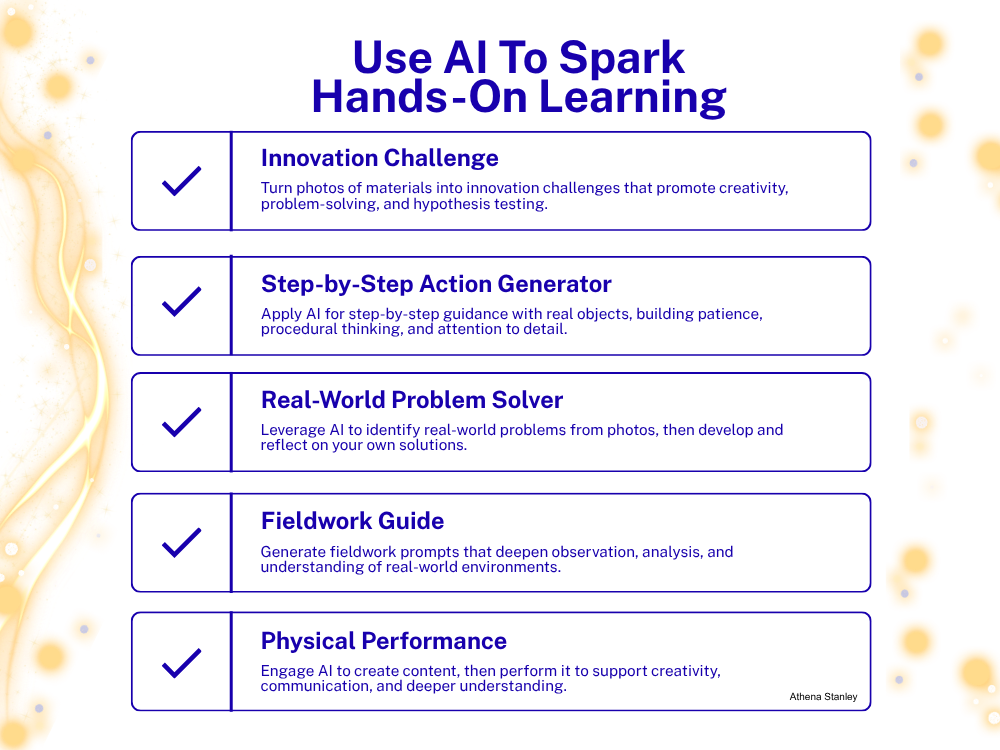
1. Innovation Challenge
Provide students with a set of physical materials to explore individually or in groups. Students take a photo of the materials and ask AI to generate an innovation challenge based on what they see.
This approach encourages creativity, problem-solving, and experimentation. Prompts can be tailored to include specific learning objectives, such as forming a hypothesis, testing ideas, or presenting a final solution from the perspective of an inventor.
Example AI Prompt:
I am a [grade] student. I will upload a photo of materials I have. Based on these materials, create an innovation challenge for me.
Include:
- A clear goal
- A requirement to form and test a hypothesis
- At least one constraint
- A final step where I explain my thinking or present my solution as an inventor
2. Step-by-Step Action Generator
AI can support students in learning how to complete tasks through structured, sequential steps, helping to build patience, attention to detail, and procedural thinking.
Students take a photo of an object and ask AI to guide them through a process step by step. The activity can be structured so that students must complete each step physically before moving on. This can extend to real-life tasks such as preparing food, assembling items, or repairing objects.
Example AI Prompt:
I will upload a photo of an object. Give me step-by-step instructions to complete a task using this object.
Only give me one step at a time.
After each step, I will confirm I completed it (and send a photo of my progress) before you give the next one.
Include simple reflections I can answer after the task is complete.
3. Real-World Problem Solver
Students take a photo of their environment, at school, home, or in the community, and ask AI to identify problems within that setting without offering solutions.
Students then work independently or collaboratively to develop their own solutions. Afterward, they can compare their ideas with AI-generated feedback, supporting evaluation and reflection.
Example AI Prompt
I will upload a photo of a real-world environment.
Identify problems or challenges you observe in this image.
Do NOT provide solutions.
Ask me 2–3 follow-up questions to help me think more deeply about the problems.
4. Fieldwork Guide
During fieldwork or observation activities, students can use AI to generate prompts that deepen their noticing and analysis.
These prompts can guide students to think about systems, space, function, safety, cause and effect, and perspective. The result is richer observation data and more meaningful engagement with real environments.
Example AI Prompt:
I am going into a real-world environment for observation.
Generate a fieldwork guide with observation prompts.
Include categories such as:
- What I notice
- How things function
- Movement and space
- Safety and organization
- Cause and effect
- Different perspectives
Make the prompts open-ended and appropriate for a student.
5. Physical Performance
Students use AI to help design a performance-based representation of their learning, then bring that performance off screen.
AI can support the creation of a song, rap, chant, script, or role-play scenario based on academic content. Students then adapt, rehearse, and perform their work individually or in groups.
This approach supports embodied learning, creativity, communication skills, and deeper understanding through expression.
For example, a student studying mammals might generate a short rap explaining key characteristics and habitats, then refine and perform it for the class.
Students can extend their learning by reflecting on how they modified the AI output and how performance shaped their understanding.
Example AI Prompt:
I am learning about [topic].
Create a short [rap/song/script/role-play] that teaches the key ideas in a way I can perform.
Keep it simple so I can adapt it.
Include clear main ideas, but leave room for me to add my own words and actions.
Beyond The Screen
AI should extend learning, not contain it. When used intentionally, it can open pathways for students to engage more deeply with the world around them.
The teacher remains the designer of the experience, shaping how AI is used to initiate and guide learning. The goal is not tool use, it is thinking.
When thoughtfully implemented, the most meaningful use of AI in education may not be what happens on the screen, but what happens after students close it.
Source link
#Screen #World #Ways #Spark #HandsOn #Learning #K12 #Classrooms #TeachThought